The Evolution of Testing Accommodations: Replacing Human Readers
For decades, students with documented reading disabilities relied on human adult readers during standardized examinations. While well-intentioned, human readers introduce significant testing variables: varying cadence, inadvertent inflection cues, scheduling headaches for testing centers, and feelings of stigma or anxiety for students.
Exam-approved reading pens represent a transformative upgrade. A handheld scanning pen delivers objective, uninflected text-to-speech playback through wired headphones. The student controls their own pacing, re-reads ambiguous test questions independently, and tests alongside their peers without requiring a separate isolation room.
Standardized Testing Compliance Rules: What Is Strictly Prohibited?
National and international testing organizations—including the Joint Council for Qualifications (JCQ) in the UK, the College Board (SAT & AP exams) in the US, ACT Inc., and state department of education assessment boards—maintain strict criteria regarding assistive hardware.
To ensure absolute academic integrity, exam regulations strictly ban the following capabilities in testing environments:
1. Wireless Connectivity: No active Wi-Fi, cellular, or Bluetooth transmission of any kind.
2. Word Dictionaries & Definitions: The pen cannot provide vocabulary definitions, synonyms, or linguistic hints that could compromise reading comprehension questions.
3. Language Translation: The pen cannot translate foreign terms into the student’s native language.
4. Digital Storage & Text Recording: The pen cannot store scanned test passages or retain question text in memory after power-off.
5. Photographic Image Capture: The pen cannot capture full-page camera images or save pictures of test booklets.
Dedicated Exam Hardware vs. Multi-Mode Software Lockdown
Schools and testing centers generally utilize one of two hardware pathways to satisfy testing regulations:
Dedicated Exam Readers (e.g., C-Pen Exam Reader 2): These devices feature factory-stripped firmware with zero dictionary databases, zero translation engines, and zero internal data logging. Because non-compliant features are physically absent from the hardware, proctor verification is instantaneous.
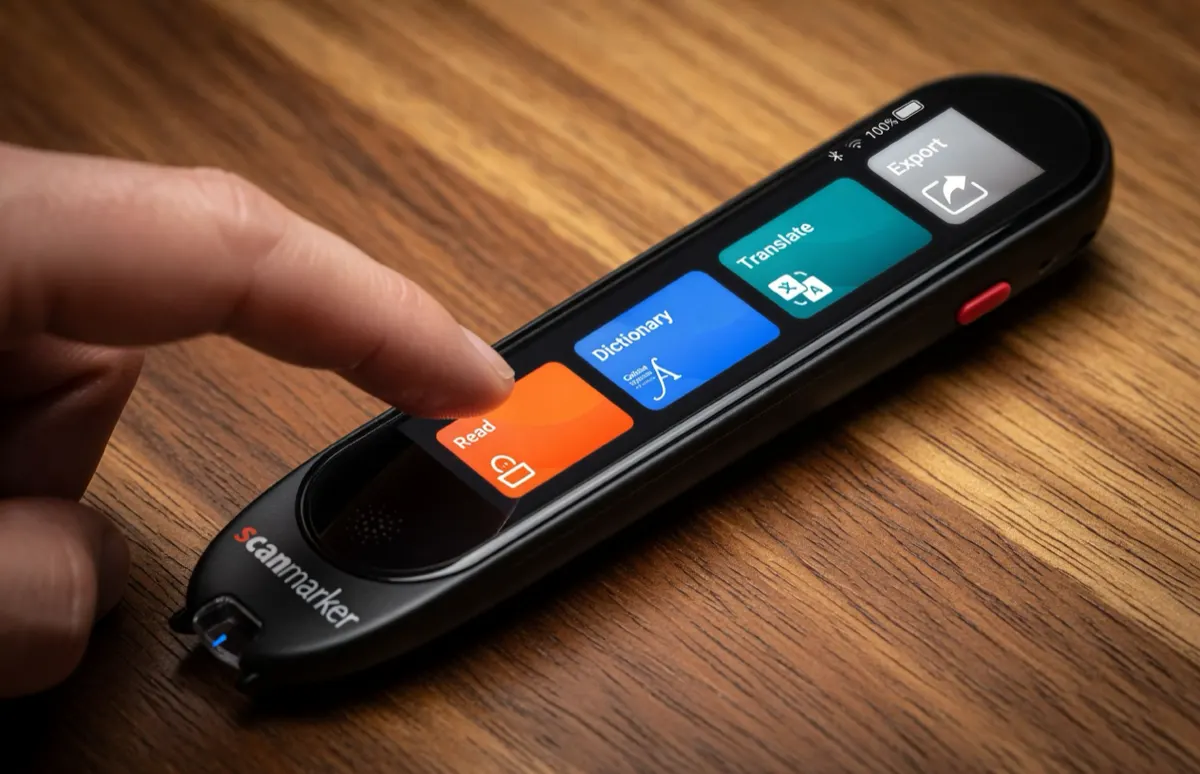
Software Lockdown Multi-Mode Pens (e.g., Scanmarker Max Exam Mode): These advanced standalone pens operate as full-featured learning and dictionary pens during daily coursework, but feature a password-protected or PIN-locked "Exam Mode" that locks out dictionaries, translation, and data logging for the duration of the test. An LED indicator or screen lock banner confirms compliance to testing proctors.
Testing Board Accommodation Guidelines: JCQ, SAT, ACT & State Assessments
The matrix below outlines accommodation protocols across major testing organizations:
| Testing Authority | Approved Assistive Category | Pre-Approval Required? | Approved Device Architecture |
|---|---|---|---|
| JCQ (GCSE & A-Levels) | Computer Reader / Reading Pen | Yes (Form 8 / Normal Way of Working) | Dedicated Exam Pen or Certified Locked Device (No dictionary) |
| College Board (SAT & AP) | Assistive Tech Reading Accommodation | Yes (SSD Online pre-approval) | Standalone offline reading pen with wired headphones |
| ACT Inc. | Standardized Test Reader | Yes (Test Accessibility and Accommodations System) | Offline standalone audio reader with memory disabled |
| US State Assessments | Individualized Reading Accommodation | Yes (Documented in active IEP/504) | Offline reading pen permitted on non-reading comprehension sections |
| International Baccalaureate (IB) | Inclusive Assessment Arrangements | Yes (D1 Request to IB Assessment Centre) | Non-dictionary, non-storage reading pen |
The 5-Point Proctor & SENCo Test-Day Verification Protocol
To guarantee zero exam interruptions or disqualifications on test day, Special Educational Needs Coordinators (SENCos) and testing proctors should execute this 5-point verification checklist:
Step 1 — Verify Firmware & Lockdown Status: Confirm that the pen displays the persistent "Exam Mode" security indicator or is a dedicated exam model.
Step 2 — Clear Internal Cache: Perform a cold restart or memory wipe according to the manufacturer’s testing protocol.
Step 3 — Inspect Headphone Connections: Ensure headphones are standard wired 3.5mm auxiliary jacks; verify that wireless Bluetooth audio is disabled or absent.
Step 4 — Test Neutral Passage Scanning: Have the student perform a calibration scan on an unrated sample sheet to confirm volume and smooth playback.
Step 5 — Establish Battery Redundancy: Verify that the pen is fully charged (minimum 80% battery capacity) to comfortably endure a 3-to-4 hour testing session.
Exam Accommodation Resources & Technical Specifications
Consult these official testing guides and verified hardware documentation when preparing assessment accommodations:
- ScannerReader.com — Standalone read-aloud pens and testing accommodation hardware reviews.
- Scanmarker for Schools — Institutional procurement for exam-ready classroom reading pens.
- PenScanner.org — Technical benchmark reports on exam reader optical latency and character accuracy.
- C-Pen Reading Guide — Comprehensive comparison of C-Pen Reader 3 vs. C-Pen Exam Reader 2.
- Pen Scanners for Schools — K-12 classroom deployment, IEP compliance, and grant funding.
Exam-friendly reading pens on Amazon
On Amazon US, the practical exam option is Scanmarker Max with its password-protected Exam Mode. C-Pen Exam Reader 2 is sold through C-Pen resellers and is not listed on Amazon US.

